Restroom Redoubt
2026-06-11 Original Prompt Part 1
Before we start, let’s get something unusual out of the way: we have some
important values that change between the sample input and the full puzzle input.
This will happen for some Advent of Code puzzles, and the way I address it in my
solution framework is to include a self.testing attribute, which is true if
we’re using the test data and false otherwise.
class Solution(StrSplitSolution): def part_1(self) -> int: width, height = (11, 7) if self.testing else (101, 103) ...Now for the interesting part: the robots. I think it’s a good idea to make a
simple Robot class today, so let’s create a dataclass
to store a robot’s properties — its X/Y position and its X/Y velocity.
from dataclasses import dataclass
@dataclassclass Robot:    px: int    py: int    vx: int    vy: int    ...
This Robot class is going to have two methods:
- An instance method that makes the robot step forward. We can make it take the
width and height as parameters, and the
%operator can be used to make the robot wrap around when it goes past the edges of the grid. - A class method for initializing a robot from a line of input. We can make the
parsing easy by extracting all the numbers using the
remodule,1 converting them toints using themapfunction, and passing them to the class constructor using the*unpacking syntax.
from dataclasses import dataclassimport refrom typing import Self
@dataclassclass Robot:    px: int    py: int    vx: int    vy: int
    def step(self, width: int, height: int):        """Move robot forward by one second."""        self.px = (self.px + self.vx) % width        self.py = (self.py + self.vy) % height
    @classmethod    def from_line(cls, line: str) -> Self:        return cls(*map(int, re.findall(r"-?\d+", line)))
It’ll be useful to visualize what’s going on with the robots, so let’s write a
quick function to help with that. collections.Counter will help us count the
robots at each tile, and we can basically loop over all the grid’s X/Y locations
and join their tiles together into a big string.
from collections import Counter
def robots_to_grid_str(robots: list[Robot], width: int, height: int) -> str:    grid = Counter((robot.px, robot.py) for robot in robots)    return "\n".join(        "".join(str(grid.get((x, y), ".")) for x in range(width))        for y in range(height)    )
Let’s also create a debug function to test this visualization function out
(using the p=2,4 v=2,-3 test line from the prompt). On each iteration of the
for loop, we will first print out the state of the grid, then we will make
each robot step forward.
...
class Solution(StrSplitSolution):    ...    def _debug_grid(self) -> None:        width, height = 11, 7        robots = [Robot.from_line("p=2,4 v=2,-3")]
        print("Initial state:")        print(robots_to_grid_str(robots, width, height))        print()
        second = 0        for _ in range(5):            for robot in robots:                robot.step(width, height)            second += 1
            print(f"After {second} second(s):")            print(robots_to_grid_str(robots, width, height))            print()
Here’s the output we get for this test case. It matches what the prompt says we should get, so this gives us confidence that we’re doing the visualization right.
Initial state:..............................................1..............................
After 1 second(s):...............1.............................................................
After 2 second(s):.............................................................1...............
After 3 second(s):..............................1..............................................
After 4 second(s):............................................................................1
After 5 second(s):..................................1..........................................
Now that we know how the robot update loop is going to work, adapting it for the actual puzzle will be easy; we simply have to make the robots step forward 100 times.
...
class Solution(StrSplitSolution):    def part_1(self) -> int:        width, height = (11, 7) if self.testing else (101, 103)        robots = [Robot.from_line(line) for line in self.input]
        for _ in range(100):            for robot in robots:                robot.step(width, height)
        print(robots_to_grid_str(robots, width, height))        ...
And once again, we can print the result at the end to verify that it’s correct. This is the resulting grid of robots for the prompt’s sample input after 100 simulated seconds, which exactly matches what we expect!
......2..1............1...........11.............1........12.......1....1....Only one thing is left for us to figure out: the calculation of the safety
factor. We’ll want to count the robots in each quadrant, which we can actually
do with Counter as well; we just have to figure out how to transform a robot’s
X/Y position to one of four different unique values, one for each quadrant, and
then we can simply use a Counter to count them.
The way I found to do this is with a tuple of bools, which are true if the
X/Y position is greater than the middle X/Y value and false otherwise. This
gives us four possible unique values for the quadrants like we want:
(False, False)= the upper left quadrant.(False, True)= the lower left quadrant.(True, False)= the upper right quadrant.(True, True)= the lower right quadrant.
We’ll only want to count the robots that aren’t exactly in the middle X or Y
positions, and then we’ll want to return the product of the quadrant robot
counts using math.prod.
from collections import Counterfrom math import prod
def safety_factor(robots: list[Robot], width: int, height: int) -> int:    mid_x, mid_y = width // 2, height // 2
    quadrants = Counter(        (robot.px > mid_x, robot.py > mid_y)        for robot in robots        if robot.px != mid_x and robot.py != mid_y    )    return prod(quadrants.values())
The safety factor after 100 simulated seconds will then be our answer.
...
class Solution(StrSplitSolution):    def part_1(self) -> int:        width, height = (11, 7) if self.testing else (101, 103)        robots = [Robot.from_line(line) for line in self.input]
        for _ in range(100):            for robot in robots:                robot.step(width, height)
        return safety_factor(robots, width, height)
We were thankfully able to keep our Part 1 code relatively simple… which, in my estimation, means that Part 2 is either going to be simple as well (even if a clever insight may be needed) or way more complicated. Only one way to find out…
Part 2
I’ll be honest: I didn’t like this puzzle in 2024, and I still don’t like it now. What does the prompt even mean by “a picture of a Christmas tree”? I don’t like having to guess at such an ambiguous requirement.
Originally, I solved this part by looking at the Reddit solution thread and implementing the first purely programmatic approach I saw that worked for somebody; luckily, it just so happened to work for me. But as it turns out, that approach didn’t work for everyone… and neither did the second approach I saw. This reminded me of how I felt about 2023 Day 21 — that is to say, not very good.
I can assure you that, once you know what this “Christmas tree” picture looks like, you’ll definitely know it when you see it, and maybe you could figure out how to find that specific picture in code. But it’s no fun to be told what it looks like beforehand — and in theory, you shouldn’t have to be told. So I asked myself: if I didn’t already know what I was looking for and how to find it, how would I have figured it out? Here’s what I landed on.
Whatever this “Christmas tree” looks like, it’s probably going to look like some
sort of recognizable pattern, and not like random noise. If we decided to
compress the grid of robots,
the resulting size would probably be lowest once the Christmas tree shows up,
because data with patterns compresses better than completely random data. Python
has several builtin compression modules,2 which have been
consolidated into a package called compression
since version 3.14; let’s use the compression.zlib module and see what
happens.
Before that, however, let’s quickly do the job of unifying both our solution
functions for today. We’ll want to loop through every possible grid state —
because of the simple way the robots move, all robots go back to their original
positions after width * height seconds3 — and exit early if we
find the solutions to both parts. (We’ll write the part that finds the Part 2
solution later.)
...
class Solution(StrSplitSolution):    def solve(self) -> tuple[int, int]:        width, height = (11, 7) if self.testing else (101, 103)        robots = [Robot.from_line(line) for line in self.input]
        part_1, part_2 = None, None        for second in range(max(width * height, 100) + 1):            grid_str = robots_to_grid_str(robots, width, height)
            if second == 100:                print("Robots after 100 seconds:")                print(grid_str)                print()                part_1 = safety_factor(robots, width, height)
            # TODO Add solve-Part-2 code
            if part_1 is not None and part_2 is not None:                break
            for robot in robots:                robot.step(width, height)        else:            assert part_1 is not None, "failed to simulate 100 seconds"
        return part_1, part_2
Attention
Pay attention to the update order in the for second in loop!
- First, the robots are converted to a grid string, and then analyzed for the information we want.
- Then, the robots all step forward.
This ensures that the recorded grid/safety factor and the value of second
match; for example, second is 0 at the point before any robots have moved. I
didn’t keep this in mind at first, and so my first submitted answer was
off by one.
Now to test out the compression package. I’ll be saving the grid strings at
each second, and at the end I’ll want to find and report the “most compressible”
grids — the grids with the smallest size after being compressed. Each of the
modules in the compression package has a compress function for performing
that compression method on a bytes object — which we can create from our
string by calling its str.encode
method before passing it.
>>> from compression.zlib import compress>>> data = """Around the world, around the world... Around the world, around the world... Around the world, around the world... Around the world, around the world... Around the world, around the world... Around the world, around the world... Around the world, around the world... Around the world, around the world""">>> len(data)279>>> compressed = compress(data.encode())b'x\x9cs,\xca/\xcdKQ(\xc9HU(\xcf/\xcaI\xd1QHD\x13\xe1r\x1c\x81J\x00\x14\x88d\xc7'>>> len(compressed)33To efficiently get the n smallest items according to some metric, we can use
the heapq.nsmallest
function with an argument for the sorting key; in this case, the key will be
the length of the grid string after using compress on it. So I’ll save the
grid string at each simulated second in a dict, and I’ll get the 5 smallest
items — pairs of each second value and grid string4 —
by that metric and print them.
from compression.zlib import compressfrom heapq import nsmallest...
class Solution(StrSplitSolution):    def solve(self) -> tuple[int, int]:        ...        part_1, part_2 = None, None        grids: dict[int, str] = {}        for second in range(max(width * height, 100) + 1):            grid_str = robots_to_grid_str(robots, width, height)            grids[second] = grid_str            ...        else:            assert part_1 is not None, "failed to simulate 100 seconds"
        most_compressible_grids = nsmallest(            5,            grids.items(),            key=lambda kv: len(compress(kv[1].encode())),        )        part_2 = most_compressible_grids[0][0]  # TODO Verify solution
        print("Most compressible grids")        print("---")        for second, grid_str in most_compressible_grids:            print(f"After {second} second(s):")            print(grid_str)            print()
        return part_1, part_2
With any luck, we’ll see the Christmas tree image within these highly compressible grids, so we know exactly what we’re looking for. In my case, the most compressible grid occurred after 7,286 simulated seconds, and it in fact had the Christmas tree image!
The Christmas tree image (click to show)
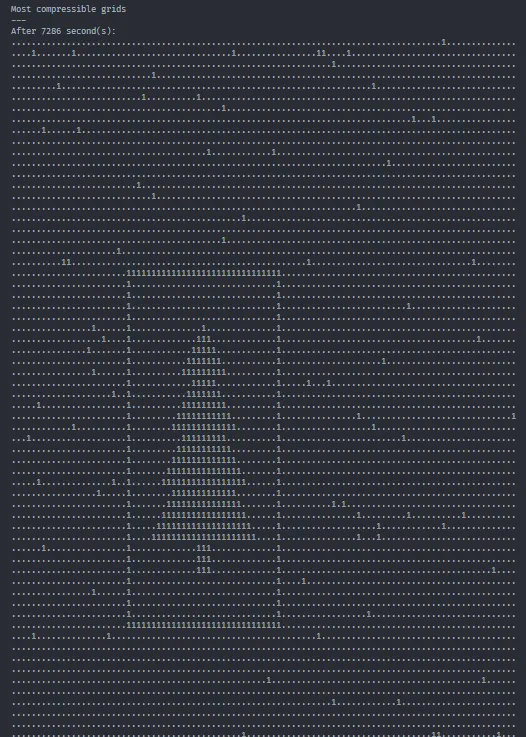
Perfect. Now we know what the Christmas tree looks like, and we even have code to find it. But the repeated compression on every single grid string makes this code pretty slow: it takes ~16.5 seconds to run on my machine. We know exactly what we’re looking for now, so we should be able to improve the runtime with a different approach to searching for it (as well as exiting early once we know we’ve found it).
The easiest distinctive feature I can think of to search for is the solid
rectangular border around the tree; this is a feature of no other grids, and we
can probably detect it very simply. I counted that the border is 31 tiles wide
and 33 tiles high; using this knowledge, we can search for "1" * 31 (i.e. 31
copies of the string "1") in the string, and if we find it, that’s almost
certainly going to be the horizontal segment of the border around the tree.
from compression.zlib import compressfrom heapq import nsmallest...
class Solution(StrSplitSolution):    def solve(self) -> tuple[int, int]:        width, height = (11, 7) if self.testing else (101, 103)        robots = [Robot.from_line(line) for line in self.input]
        part_1, part_2 = None, None        grids: dict[int, str] = {}        for second in range(max(width * height, 100) + 1):            grid_str = robots_to_grid_str(robots, width, height)            grids[second] = grid_str
            if second == 100:                print("Robots after 100 seconds:")                print(grid_str)                print()                part_1 = safety_factor(robots, width, height)
            # HACK Because we know the Christmas tree has a solid border            # around it, we can simply check whether this border exists.            if "1" * 31 in grid_str:                print(f"Christmas tree found after {second} seconds:")                print(grid_str)                print()                part_2 = second
            if part_1 is not None and part_2 is not None:                break
            for robot in robots:                robot.step(width, height)        else:            assert part_1 is not None, "failed to simulate 100 seconds"            assert part_2 is not None, "Christmas tree Easter egg not found"
        return part_1, part_2
This brings the runtime down to ~7.7 seconds on my machine. That might be as good of a general solution as I can get.
Footnotes
-
This time, the regular expression we use —
-?\d+— will also optionally match a minus sign before the number, because the X/Y velocities can be negative. (This hasn’t been the case in the other puzzles so far this year, so leaving this out may throw you off.) ↩ -
These modules are all “optional modules”, which aren’t required to be included in a Python distribution — in this case, because the necessary third-party compression libraries aren’t available for some platforms.
These modules are all available in my version of CPython for Windows, so I’ll be using them in this writeup. But even if they’re not available for you, the same principle would apply if you instead used a custom function for doing run-length encoding. (In fact, try making such a function anyway as an exercise! I found a neat way to do it using
itertools.groupby.) ↩ -
Of course, because we only get the answer to Part 1 after 100 simulated seconds, we’ll want to make sure that we’re simulating at least 100 seconds. This is the purpose of that
maxcall. ↩ -
Amusingly, the “second value” is first. (In other words, the number of elapsed seconds is the first item of the pair.) ↩