Race Condition
2026-10-29 Original Prompt Part 1
Another day, another grid puzzle. In fact, it’s some sort of strange race where we’re allowed to cheat by phasing through the walls. We might just have a winning chance here, but we have to choose our cheats wisely.
First, let’s read the map of the racetrack in a way our program can understand.
The way I do this for Advent of Code is with a custom grids module;
read my writeups for Days 4, 6,
8, 10, 12,
15, 16, and 18
to see how it works in more detail.
In our case, we want to ignore the wall (#) tiles, so that checking whether we
can visit a tile is as easy as checking whether it exists in our grid. And once
we have our grid, we can find the start and end points with next() and some
simple generator expressions.
class Solution(StrSplitSolution): def part_1(self) -> int: grid = parse_grid(self.input, ignore_chars="#") start = next(k for k, v in grid.items() if v == "S") end = next(k for k, v in grid.items() if v == "E") ...Next, let’s find the path from the start to the end — and record each tile’s distance along the path, so we can calculate our time savings later.
We are assured that the path is unique, so we can start at the starting tile (at
distance 0) and keep travelling to the next valid neighboring tile (increasing
the distance by 1) until we reach the end. (My grids module has a neighbors
function to get neighboring tiles; we’ll want to travel to an unvisited neighbor
that’s still in the grid, which we can choose with next() because we’re
assured there’s only one.)
class Solution(StrSplitSolution): def part_1(self) -> int: ... # Find the distances of all tiles from the start # NOTE This assumes there is only one path to the end. distances = {start: 0} loc = start while loc != end: # Move to the next neighbor that's in the grid and that # hasn't yet been visited new_loc = next( n for n in neighbors(loc, num_directions=4) if n in grid and n not in distances ) # We've moved forward by one tile distances[new_loc] = distances[loc] + 1 loc = new_loc ...Finally, let’s do the important part: counting all the best cheats. We’re only
allowed to consider cheats between tiles with a “taxicab distance”
— i.e. grid-based distance, where only movements along grid lines are allowed
— of 2 or less. My grids module has a taxicab_distance function for this,
and the formula is rather simple:
type GridPoint = tuple[int, int]...
def taxicab_distance(a: GridPoint, b: GridPoint) -> int:    return abs(a[0] - b[0]) + abs(a[1] - b[1])
So all the potential cheats would simply be all pairs of tiles with a taxicab distance of 2 or less;1 we’ll want to tally up all potential cheats where this taxicab distance saves at least 100 picoseconds over the normal distance (i.e. the difference between the recorded path distances for both tiles).
class Solution(StrSplitSolution): def part_1(self) -> int: ... # A potential cheat is a cheat within the allowed length potential_cheats = ( (a, b) for a in distances.keys() for b in distances.keys() if taxicab_distance(a, b) <= 2 ) # A good cheat is a cheat that saves at least 100 picoseconds # over travelling on the path normally num_good_cheats = sum( 1 for a, b in potential_cheats if taxicab_distance(a, b) <= distances[b] - distances[a] - 100 ) return num_good_cheatsTip
Let’s say you want to count the number of items in a collection that fit some
condition. There are a few different ways to do this, but one of the easiest
ways is using sum() to add up a 1 for each item you want to count. For
example, to count the even numbers in a sequence of numbers, you can do
sum(1 for n in seq if n % 2 == 0). (This works even if you can’t call len()
on your sequence, e.g. if it’s a generator.)
I use this technique above to count the number of “good” time-saving cheats. It’s a useful idiom to know.
This is good enough to get an answer; however, it takes about 8 seconds on my machine, which tells me that I’m doing something inefficiently. Let’s worry about that in Part 2.
Part 2
The only thing that’s changed in Part 2 is the allowed cheat length, so let’s
first factor out our entire solution into a function with a cheat_length
parameter.
class Solution(StrSplitSolution):    def _solve(self, cheat_length: int) -> int:        ... # Part 1 code from before        # A potential cheat is a cheat within the allowed length        potential_cheats = (            (a, b)            for a in distances.keys()            for b in distances.keys()            if taxicab_distance(a, b) <= cheat_length        )        ... # More Part 1 code from before
    def part_1(self) -> int:        return self._solve(cheat_length=2)
    def part_2(self) -> int:        return self._solve(cheat_length=20)
In fact, if all we want is to eventually get an answer, we’re done! But that takes about 16 seconds on my machine, and I think we can do much better than that. So how can we speed up our search of cheats?
At the moment, we’re looking at all possible pairings of start and end tiles, and then filtering them down to pairings within the allowed cheat length. But if you think about it, it doesn’t make sense to check all of those pairings; once we have a possible start tile, the only possible end tiles will be the tiles within our required distance from that start tile. In fact, all the end tiles will just be all tiles within a “circle”2 of the start tile — though in the “taxicab geometry” we’re working in, a “circle” looks more like a tilted square.
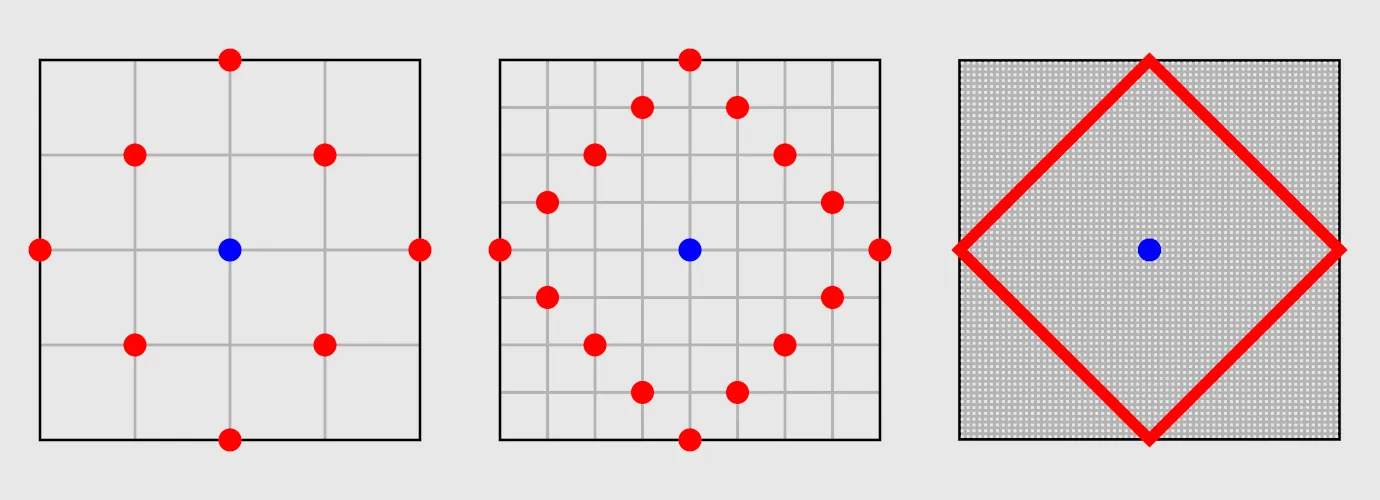
(Image modified from the Wikimedia Commons.)
Let’s write a function for this; we can have it iterate through all points
within a given “radius” of a given center point. My custom grids module
includes a helpful add_points function to add GridPoints (i.e. tile
locations) together, so we can just choose dx/dy pairs where the distance
from (0, 0) — that is, abs(dx) + abs(dy) — is at most our radius, and add
those dx/dy pairs to our center point. Here’s an unfinished sketch of what
this function would look like.
from collections.abc import Iterator
def points_within_radius(        center: GridPoint,        radius: int,) -> Iterator[GridPoint]:    """    Yield all points within a given radius of the center point (by    taxicab distance).    """    for dx in range(-radius, radius + 1):        # TODO Choose max_dy so that abs(dx) + abs(dy) <= radius        max_dy = ...        for dy in range(-max_dy, max_dy + 1):            yield add_points(center, (dx, dy))
We’re looping dx from -radius to radius, and dy from -max_dy to
max_dy… but what is max_dy? Simply put, max_dy should be whatever we’d
need to add to abs(dx) to get a distance of radius — in other words, it
should be radius - abs(dx). Not difficult at all!
from collections.abc import Iterator
def points_within_radius(        center: GridPoint,        radius: int,) -> Iterator[GridPoint]:    """    Yield all points within a given radius of the center point (by    taxicab distance).    """    for dx in range(-radius, radius + 1):        max_dy = radius - abs(dx)        for dy in range(-max_dy, max_dy + 1):            yield add_points(center, (dx, dy))
We’ll use this function to limit our choices for b points of potential cheats
once we have an a point. If we think of distances.keys() (our path points)
and points_within_radius(a, cheat_length) (the points within our “circle”) as
sets of points, we can use the & (set intersection) operator to get the points
in common between both of those sets — i.e. the points that are both on our
path and within our “circle”.
...
class Solution(StrSplitSolution):    def _solve(self, cheat_length: int) -> int:        ...        # A potential cheat is a cheat within the allowed length        potential_cheats = (            (a, b)            for a in distances.keys()            for b in distances.keys()            if taxicab_distance(a, b) <= cheat_length            for b in distances.keys() & points_within_radius(a, cheat_length)        )        ...
Attention
Set operators
such as & normally require both operands to be sets — not just generic
collections of objects, but instances of the set type. If you want to do these
operations to things other than sets, the usual approach is to use the
non-operator versions of these operations such as set.intersection().
In this case, though, neither of the sets of points we’re dealing with are
properly sets; one is a “dictionary view”,
and the other is a “generator iterator”.
But a “dictionary view” object is enough like a set that set operators work
just as well with them; in fact, the other operand doesn’t even have to be a
set for the set operators to work!
This change brings the total time down to ~1.85 seconds on my machine. Far from picosecond-level fast like the puzzle prompt describes, but definitely an improvement.
Footnotes
-
The way I get every pair of tiles is a bit redundant; some of the pairs will have two of the same tile (so using the cheat would not help), and some of the pairs will have tiles
aandbin reverse path order (so using the cheat would actively hurt). However, this doesn’t affect our answer, because these unhelpful cheats are filtered out by the “good” cheats check. ↩ -
Technically, because we want both the boundary points and the interior points of this “circle”, what we want is actually called a “disk”. The only problem is, I can’t find a good visualization of this kind of object by Googling “taxicab geometry disk”… so just imagine that all the interior points in those images are filled in as well. ↩